Please enter valid email id
Files
Feedback
Tasks
&
Approvals
Most in-house creative teams are held together by Asana, Google Docs, Dropbox, email threads, and Slack DMs. It works... until it doesn't.
Written in a Google Doc, shared over email, forgotten by the time work starts. No structure, no version, no accountability.
Is that asset approved? Which version did the client see? The answers are buried in email threads nobody can find.
Comments in email, markups on PDF, verbal notes in a meeting. Creatives spend hours just reconciling what was actually said.
v3_FINAL_approved_USE-THIS.psd. In Dropbox. Or was it Drive? Or did someone send it on WhatsApp? Crisis incoming.
Approval is a WhatsApp thumbs-up or a verbal in a meeting. Nothing is recorded, nothing is locked until the rework arrives.
Tasks in Asana, files in Dropbox, briefs in Notion, feedback in email. Keeping them in sync is a full-time job nobody signed up for.
Built around how creative work actually flows, not how a generic project manager thinks it should.
Every project starts with a structured brief, not a blank doc. Objectives, deliverables, deadlines, and reference assets captured in one place and attached to the work from day one.
Scope the work, assign ownership, set milestones. Tasks are tied directly to deliverables, not floating in a list that could belong to any project.
Every asset lives in one place with a full version history. The answer to "which file is latest?" is always visible, always accurate.
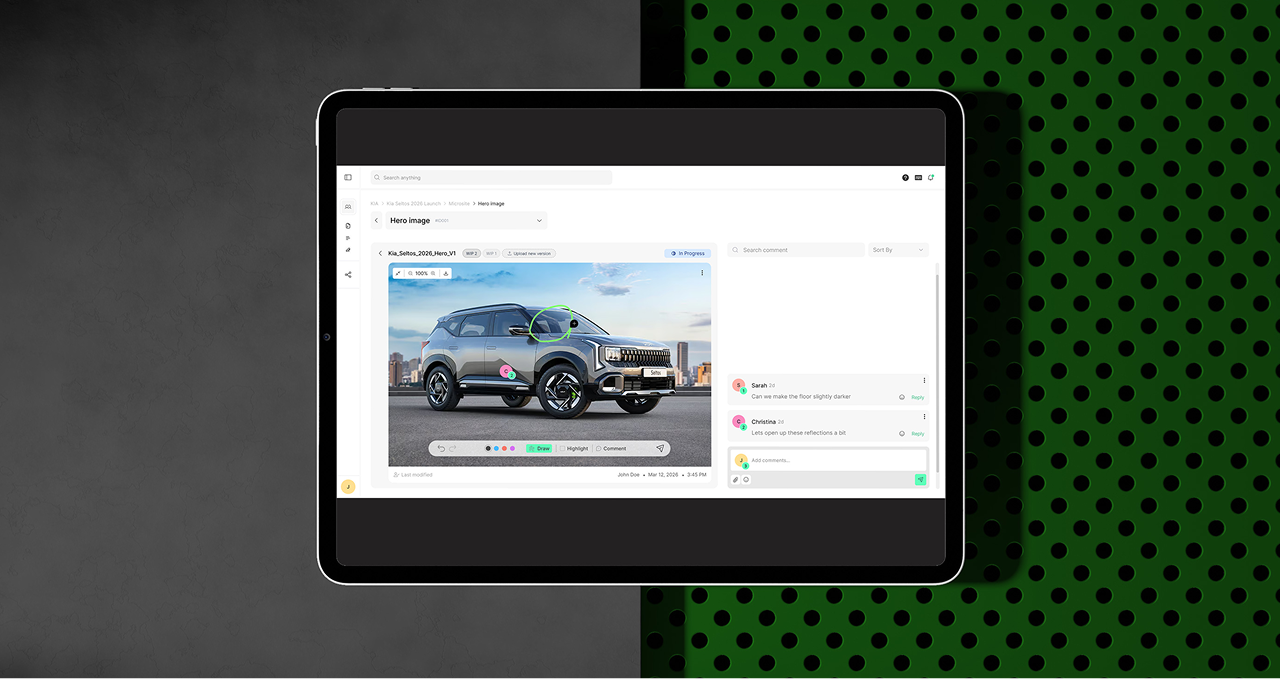
Run quality checks internally before client eyes touch the work. Contextual feedback and annotations tied to the exact file and version being reviewed.
Share work through a clean review portal. Stakeholders see what you want them to see, give feedback where it matters, and make a binding decision. No ambiguity.
Approved assets are locked and packaged for delivery alongside master files and a complete record of who approved what, when, and which version.
Most teams eventually outgrow Asana.
None of them want to install a full agency ERP. QuickProof is what sits between them.
No concept of a brief or creative scope
Files and tasks live in separate tools
No approval workflow or client portal
No version control or asset history
No delivery packaging or audit trail
Brief intake as the starting point of all work
Tasks, files, and feedback in one system
Structured review and sign-off flow
Full version history on every asset
Delivery packages with immutable approval records
QuickProof is not trying to do everything. It's built to do one thing exceptionally well: give your creative team complete operational clarity, from the moment a brief lands to the moment a final asset is signed off and delivered.
Every feature earns its place by making the work clearer, not just more tracked.
place for briefs, tasks, files, review, and delivery
ambiguity about who approved what and when
audit trail from brief intake to final sign-off
for how creative work actually gets done
Simplify your creative process with creative workflow software. Keep designs, feedback, and approvals organized so your team can focus on creating.
With task management tools, teams can assign work, track progress, and deliver projects faster and on time.
With task management tools, teams can assign work, track progress, and deliver projects faster.

Creative workflow software helps creative teams manage the process of getting work from brief to delivery. It brings together the things that tend to get spread across different tools - briefs, tasks, files, feedback, revisions and approvals - and connects them in one workflow.
The difference from general project management is that creative workflow software is built around how creative work actually happens. A file gets sent for review, feedback creates another task, an approval unlocks the next stage, or a change to the brief affects the timeline.
Instead of treating these as separate activities, creative workflow tools keep them connected so everyone can see what needs to happen next.
The best online proofing software is the one that makes reviewing creative work simple for both your team and your clients. A good online proofing tool should let reviewers comment directly on the work, keep feedback attached to the right version, and make it clear what has been addressed and what still needs attention.
But proofing is only one part of the creative workflow. If feedback then has to be copied into another project management tool, approval tracked in email, and the final file stored somewhere else, you've solved one part of the problem while keeping the rest of the process fragmented.
QuickProof combines online proofing with briefs, tasks, files, and approvals, so feedback can move directly into the work instead of becoming another disconnected step.
Creative workflow management software connects the different stages of a creative project, from the initial brief through production, review, revisions, approval, and delivery.
A brief defines what needs to be made. Tasks turn that into work. Files are produced, uploaded and sent for review. Feedback creates changes or new tasks. Approvals move the work forward. Because these stages are connected, the team can see not just what has been done, but what's waiting, what's blocking progress, and what needs to happen next.
Yes. Small teams often have to do more with fewer people. One person might be managing the client, coordinating the project, assigning work, chasing feedback, and keeping an eye on deadlines - sometimes all in the same day.
A streamlined workflow can take some of that mental load off. QuickProof keeps ownership clear and automatically surfaces things like project health, overdue work, and pending approvals, so people don't have to constantly check in just to figure out what's happening.
A small team may not have the headcount of a larger agency, but it can still give clients the same feeling that everything is organised, moving, and under control. QuickProof helps create that kind of operational clarity without adding a lot of process.
Task management tools are good at answering a fairly simple question: who needs to do what, and when?
Creative workflow software looks at the wider process. What brief did the work come from? Which files, feedback, and approvals are connected to it? It brings together capabilities you'd typically find across file management, brief intake, task management, or design feedback tools - in one workflow.
That's important because creative work isn't linear. It's iterative and collaborative, with work moving back and forth between creation, review, feedback, revision, and approval. A task list can tell you what's on someone's plate, but it doesn't capture how that work fits into the larger creative process.
It depends on the size of your team and how you use the software. Creative workflow tools can be priced in different ways, including per seat or based on the number of projects you manage.
When comparing options, it's worth looking at both the pricing model and what your team actually needs, since a per-seat plan may make more sense for one team while a project-based model may work better for another.
We’re opening access to a limited number of teams. No pricing gimmicks, just a real conversation about whether it’s a fit.
Please enter valid email id